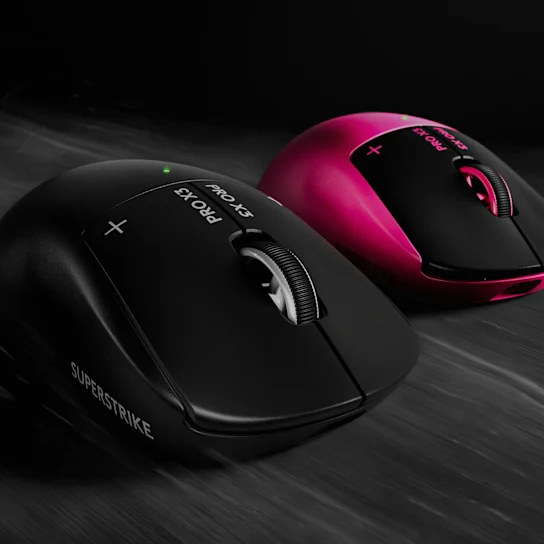
The verdict
The technology impresses. The complete experience falls short for me.
HITS delivers meaningful click customization and the in-game performance deserves credit. But personal fit, everyday convenience, and the $200 price keep the Superstrike from becoming the mouse I want to reach for.
Appealing for someone who loves the shape and wants adjustable clicks, but difficult to justify for my preferences.
At a glance
The Superstrike
Battery life is a manufacturer claim, not an AVYN runtime measurement. Polling rate and haptic settings affect runtime. Prices reflect the review, not live offers.
Full written review
Does it actually serve me better?
The Logitech G Pro X3 Superstrike has some seriously impressive technology. I can appreciate what Logitech has built here and how well it performs. But after spending time with it, recording this review, and getting the gameplay, I keep coming back to one question: does this mouse actually serve me better than the other mice on my desk? Because at $200, being impressive is only part of the job. This is AVYN. Your gear needs to serve you.
Hands down, the biggest reason to care about this mouse is HITS—the Haptic Inductive Trigger System. Instead of relying on traditional microswitches for the main clicks, the Superstrike uses inductive sensing and haptic feedback. This lets you customize when the click registers, how it resets, and the feedback you feel through the button. Think about what customizable actuation and rapid trigger brought to keyboards. This brings a similar level of control to gaming mice. You can tune the clicks around how you actually play, whether you want the smallest possible movement to register or a little more travel before an input happens. That innovation is meaningful because it gives you control over something you usually just accept when buying a mouse.
The performance absolutely deserves credit. My criticisms do not erase what this mouse does in a game. The X3 supports up to 8,000 Hz polling over both wireless and USB, and Logitech lists its weight at around 59 grams. Mine came in at 58 grams. The new NxLOGI chipset also brings a focus on efficiency and wireless performance. There is plenty here for a competitive gamer to appreciate. But once I’m actually playing, I’m also thinking about comfort, confidence, and whether I enjoy having this particular mouse in my hand. That is where the conversation starts to change for me.
The shape just isn’t for me personally. That doesn’t make it a bad shape, and somebody who loves this symmetrical design could have a completely different experience. I simply prefer the feel of some other mice, and a new click system doesn’t change how my hand fits the shell. The Lamzu Thorn V2 is an example of a shape I really enjoy. For a symmetrical mouse, the WLMouse Beast X Pro Max is my personal favorite. Comparing it alongside the Superstrike also puts weight into perspective, because click technology is only part of what you are moving around on your mousepad. Shape, weight, and comfort matter every single time I sit down to play. A mouse can have more advanced technology and still be the one I’m less interested in picking up.
There is also a small detail with the haptics. When I deliberately look for it, I can perceive a subtle delay in the feedback. I want to be precise: that is my perception of the haptic sensation. I’m not presenting it as a measurement of input latency or saying my shots register late. They don’t. Everything reacts the way it should on the screen, but sometimes the little buzz that indicates a click feels like it arrives slightly afterward. That could be specific to my unit, but I would be interested to hear whether others notice it too.
Then there are the everyday details. The dongle leaves me wanting more. I’ve been spoiled by mice with receivers that give useful information at a glance, whether that is battery level, connection status, or polling rate. At this price, I would appreciate a clearer way to see that information without having to go looking for it. I also want a web driver. Being able to open a browser, change my settings, and get back to playing is a convenience I value. That is exactly the kind of thing I mean when I ask whether your gear serves you. Having to use installed software feels like an extra step I would rather avoid.
Battery life is another part of that experience. Logitech advertises more than 135 hours for the X3, but a headline figure doesn’t describe every polling rate and haptic configuration. My priority is simple: I want to use the settings I enjoy without battery life becoming something I have to keep thinking about. That peace of mind matters when I’m judging whether a mouse serves me.
All of this brings me back to the price. Because of the price, I feel obligated to use this mouse rather than particularly compelled to use it. I find myself thinking about how much it costs instead of simply wanting to pick it up and play. At $200, I want an experience I’m excited to return to. Even at a hypothetical $100, my preferences about its shape, feel, and overall ownership experience would still exist. Price is a major criticism, but it isn’t the only thing holding this mouse back for me.
Something else I find interesting is that, from what I’ve been reading, some people are tuning their Superstrike to feel like their Superlight 2. Familiarity matters, and having that choice is a benefit. But it does make me question the value of spending $200 on new click technology if you then adjust it to recreate what you already had. I’m also interested in seeing what Keychron brings to the table with the G6 and how it compares. The Superstrike has impressive technology, but that doesn’t automatically make it the best mouse for your money.
Price comparison
What else does $200 buy?
The alternatives make that price harder to ignore. At the prices cited in my video, the Lamzu Thorn V2 was $129.99—about $70 less. The WLMouse Beast X Max V2 was $169—about $31 less. The Razer Viper V4 Pro was $160—about $40 less. Then there is the ATK A9 Ultimate Plus at $80, roughly $120 less than the Superstrike. If you want a similar shape, a very good sensor, and great clicks, that is an underrated option worth considering. These mice don’t all offer the same click technology, but they show how much choice exists below the Superstrike’s asking price.
Superstrike reference price
$31 less than the Superstrike
$40 less than the Superstrike
$70.01 less than the Superstrike
$120 less than the Superstrike
Review-time prices, not live offers. Bars share a zero baseline and a $200 maximum. These products differ in features; the chart compares price only.
At $200, the Logitech G Pro X3 Superstrike earns an AVYN Serve Score of 68 out of 100. HITS is impressive, and the performance deserves respect. If you love this shape and want this level of click customization, I understand the appeal. For me, though, the complete experience doesn’t justify the asking price. The gear I want to keep using earns its place through more than what it has on a spec sheet.
The Serve Test
What does this mouse ask from you?
Meaningful control over the click.
Custom actuation, reset, and haptic feedback, with strong in-game performance and up to 8K polling over wireless and USB.
A premium that I don’t feel compelled to pay.
The shape isn’t my preference, I want more useful dongle information and browser configuration, and the overall experience doesn’t justify $200 for me.
Disclosure
AVYN reviews products independently. If an affiliate purchase link is added, AVYN may earn a commission at no additional cost to you. Affiliate relationships do not determine our verdicts.